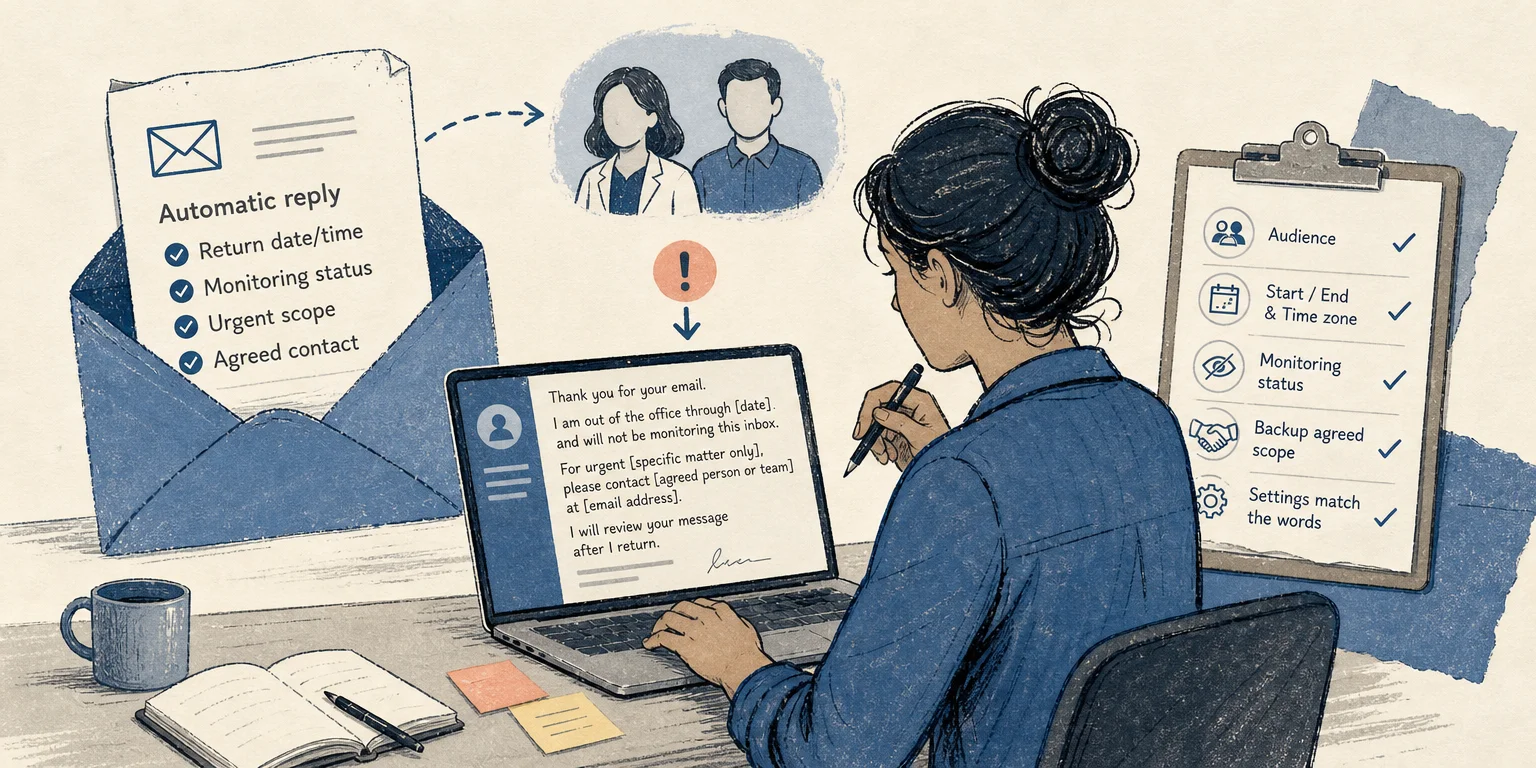
An out-of-office reply should route a message, not create the impression that somebody has read, approved, or forwarded it. Before activating one, decide what an unknown sender may safely rely on: when you expect to return, whether you will monitor email, and who—if anyone—has agreed to handle a defined urgent matter.
Adelphi University’s email guidance, accessed November 21, 2026, recommends including a return date, an expected response timeframe, and an alternate contact when appropriate. It also advises against unnecessary personal details. Those are useful content principles, but your employer’s policy and your email platform’s current instructions still control how the reply is configured.
Record the facts before writing
Fill in this private checklist first:
- Absence window: the actual start and end date and time, including the relevant time zone.
- Email access: none, occasional, or regular. Choose only what you intend to do.
- Return status: a confirmed return date, or no confirmed date yet.
- Backup: a person who has agreed to receive a defined category of urgent inquiry.
- Routing method: the sender contacts that person directly, unless authorized forwarding or shared access is genuinely in place.
- Audience: internal colleagues, external senders, or both.
A return date is not a promise to clear the inbox that day. If you cannot commit to a response deadline, say when you return without adding “I will reply immediately.” Likewise, naming a backup contact does not mean your messages are automatically forwarded or that the backup can see your inbox.
Separate the automatic reply from human action
An automatic response confirms that the system sent a notice. It does not confirm that you or a colleague reviewed the incoming request. This resembles the distinction in Humanizer.help’s guide to acknowledging a request before reviewing it: receipt, review, and approval are different states.
For an absence message, keep these states equally precise. “For urgent billing access issues, contact [agreed person or team] at [address]” routes one defined matter. “My colleague will take care of everything” assigns duties you may not have authority to assign.
Illustrative external reply
The examples below are invented teaching examples. Bracketed text is a placeholder and is not ready to activate.
Subject: Automatic reply: out of office through [date]
Thank you for your email. I am out of the office through [date] and will not be monitoring this inbox during that time. I expect to return on [date], but this does not mean I will respond to every message that day.
For urgent [specific matter only], please contact [person or team who agreed] at [email address]. Otherwise, I will review your message after I return.
Best,
[Name]
This version tells an unknown sender what the automatic reply can establish. It does not disclose why the writer is away, invent a response time, or imply that the alternate contact has access to the message.
Illustrative internal reply
Subject: Automatic reply: away [start date]–[end date]
I am away from [start date and time, time zone] through [end date and time, time zone]. I will check email [not at all / only at the stated times, if true].
For urgent [defined internal matter], contact [agreed colleague or team] through [approved channel]. Requests outside that area will wait for my review after I return.
[Name]
An internal message can name a workflow or team channel that would be inappropriate for external senders. It should still avoid claiming that the backup has accepted work outside the agreed scope.
If the return date is not confirmed
Do not insert a guessed date merely because a template expects one. Use a bounded statement that matches what is known:
Illustrative example: Thank you for your email. I am currently away and do not yet have a confirmed return date. I am not monitoring this inbox. For urgent [defined matter], contact [agreed person or team] at [address]. Otherwise, your message will remain for my review when I return.
If policy requires a different escalation route, use that route instead. Avoid giving the reason for the absence unless it is necessary and authorized.
Check the setup and the words together
Before activation, replace every placeholder and verify the audience, signature, start time, end time, time zone, and stop date. Confirm that the backup still agrees to the named scope and that the contact details work. Then compare the message with the actual settings: an external-only reply should not be mistaken for an internal notice, and a written routing instruction should not imply automatic forwarding or inbox access.
Google and Outlook have different controls, and those controls can change. Follow your organization’s policy and the platform’s current official documentation rather than assuming a universal sequence of clicks or how often each sender receives a reply. Send a permitted test from the relevant audience, check the received text, and make sure the automatic reply stops when the stated absence ends. The honest version is the one whose dates, availability, and routing still match reality after the polished wording is removed.